
yt-dlp Downloader — Docker + Chrome Extension
Introduction
Downloading high-quality video or audio from modern media platforms often involves dealing with clunky, ad-filled websites or navigating complex CLI commands. While yt-dlp is an incredibly powerful tool for downloading content from YouTube, Vimeo, TikTok, Twitter/X, Instagram, and over 1,000 other sites, running it from the command line every time you want to save a video is not always the most seamless experience.
To solve this, I built a robust yt-dlp Downloader that marries the power of the CLI with the convenience of a browser UI. It consists of a Dockerized Python Flask backend handling the heavy lifting and a sleek Chrome Extension that lets you download content directly from any supported page with a single click.
The Architecture: Bridging Browser and Backend
The project is divided into two primary components that communicate seamlessly:
1. The Dockerized Backend Server
The server is built with Python and Flask, containerized using Docker to ensure dependency consistency (no more worrying about system-level Python conflicts, FFmpeg installations, or paths). It exposes a secure local API on port 7879. When a download request is received, the server spawns a yt-dlp process enhanced with aria2c for hyper-fast, multi-threaded downloading.
The backend also features Server-Sent Events (SSE), allowing it to stream live download progress back to the Chrome extension.
2. The Chrome Extension UI & Technical Breakdown
The browser extension injects a clean, non-intrusive UI. It automatically extracts the URL of the active tab and provides a comprehensive interface that abstracts complex yt-dlp CLI flags.
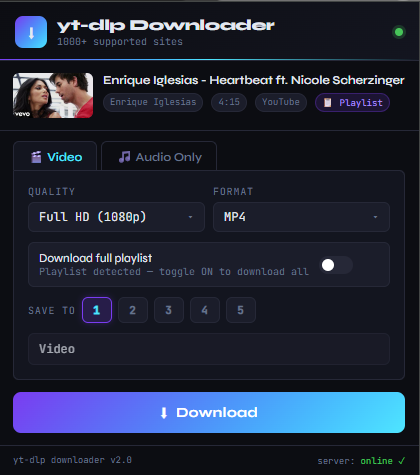
Under the hood, the extension acts as a configuration generator, constructing the exact parameters required for the backend API. Here is a detailed technical breakdown of the UI capabilities:
- Format Selection:
The extension handles format negotiation by mapping user choices to
yt-dlp's format selectors (e.g., passing-f 'bestvideo[ext=mp4]+bestaudio[ext=m4a]/best[ext=mp4]/best').
Video Formats: Supports standard video containers (MP4, WebM) with granular resolution sub-options including 4K, 1440p, 1080p, 720p, 480p, and 360p. It automatically requests the best available bitrate for the chosen resolution boundary.
Audio Formats: Provides specific codec sub-options (MP3, Opus, FLAC, WAV, M4A). Depending on the codec chosen, users can specify quality levels (e.g., 320k, 192k, 168k, 128k). Under the hood, this triggers the--extract-audioand--audio-formatflags, utilizing FFmpeg during post-processing to losslessly extract or transcode the audio stream. - Playlist Support:
When the "Download full playlist" toggle is enabled, the extension appends the
--yes-playlistargument. Internally, the backend parses the playlist metadata, generating a structured JSON map of all videos. The script then orchestrates parallel download tasks for each item, automatically creating a subfolder named after the playlist title and indexing files sequentially using%(playlist_index)smetadata formatting. - Save Location & Custom Presets:
The extension offers five distinct preset slots for directory selection. Presets 1 and 2 are globally defined via the server's
.envfile (typically for broad 'Video' and 'Music' categories), while Presets 3–5 can be customized directly within the extension UI and are stored via the browser'schrome.storage.localAPI. Selecting a preset passes a target directory path in the JSON payload, instructing the server where to route the final file after FFmpeg muxing completes.
Thanks to the background service worker, progress is tracked per URL via Server-Sent Events (SSE). You can queue up multiple downloads, close the popup, navigate to other pages, and reopen the extension on any page to instantly reconnect to its specific progress stream.
Key Features & Workflow
Intelligent Directory Structures & Metadata Handling
Files are routed and tagged meticulously. During downloading, yt-dlp automatically fetches and embeds thumbnails, chapters, and metadata tags directly into the media container. The directory paths are mapped such that single downloads save strictly to the root of the selected preset, while playlists enforce strict subfolder containment.
OS Notifications & Seamless Navigation
Once a download finishes, the background service worker triggers a Chrome system notification. Clicking this notification instantly opens your host OS file browser pointing directly to the downloaded file — complete with WSL2 path translation support.
Centralized Download Logging
Every completed or failed download is automatically appended to a yt-dlp-downloads.csv file. It captures the timestamp, video name, source URL, local path, format, and status, providing a clean historical record of all your media.
Extreme Speed Optimizations
The Docker container doesn't just run vanilla yt-dlp. It utilizes aria2c with 16 parallel connections per file, concurrent fragment downloading for HLS/DASH streams, and smart exponential backoff for rate-limit protection.
Getting Started (Quick Setup)
The beauty of this setup is in the one-command deployment. Clone the repository, copy the .env template, point DOWNLOAD_DIR to your preferred host directory, and run:
docker compose up -dOnce the server is running, simply load the unpacked extension directory into Chrome via chrome://extensions/, pin the icon, and you are ready to download anything from anywhere.
Conclusion
By containerizing the backend and connecting it to a lightweight browser extension, we eliminate friction from the media archival process. It provides the full power, format support, and speed of yt-dlp without ever forcing you to leave your browser or type a command line argument.